

Plan your tournament schedule
Rules decide which bouts run, what their bout numbers are, and which mats pull them. A plan is a set of rules a wizard makes for one session, like Guided plan or Auto-balance brackets. Saving a plan doesn’t touch the mats: when it’s time to wrestle, Run the plan (or a single rule), and Run builds, numbers, queues, and loads the mats. Schedule just means the event’s overall running order. All of this lives in Director Managed mode on Match Publishing.
If every division runs together on every mat, you may not need any of this: System-Managed Scheduling does it with one button. Switch with Switch to Director Managed on Match Publishing when you need more control.
New to scheduling? How matches get onto the mats explains the whole path from brackets to a bout on a mat.
Pick a tool
Section titled “Pick a tool”On Match Publishing, the setup choices (or Add once a plan or rule exists) offer these tools. Schedule dual brackets appears when the event has dual-tournament brackets.
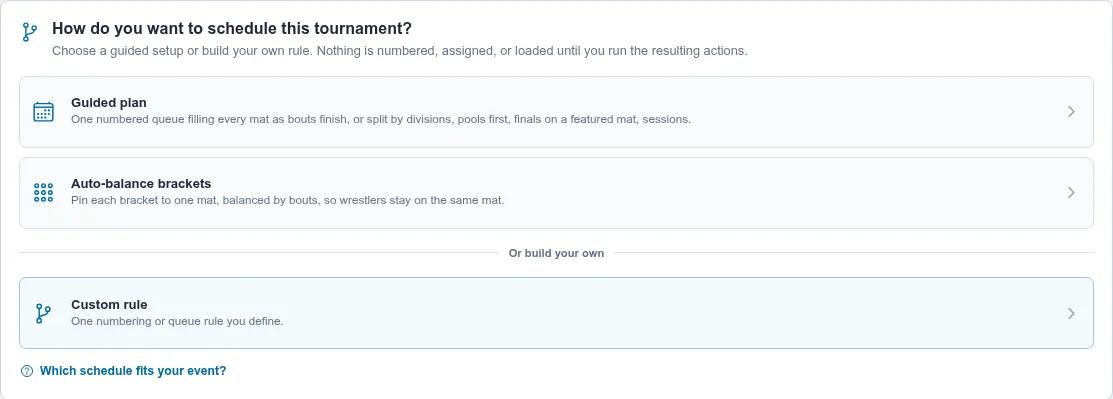
| Your situation | Use | Guide |
|---|---|---|
| Every mat shares one running order | Guided plan | One-day tournament on shared mats |
| Each bracket stays on one mat | Auto-balance brackets | Keep each bracket on one mat |
| Divisions wrestle at the same time on their own mats | Guided plan | Give divisions their own mats |
| Younger kids in the morning, older in the afternoon | Guided plan | Run morning and afternoon sessions |
| Pool brackets that feed a bracket | Guided plan | Schedule pool brackets |
| Finals and medal bouts on a featured mat | Guided plan | Run finals on featured mats |
| Rounds split across two days, or semifinals on their own | Custom rule | Schedule a two-day tournament |
| Dual tournament with several duals at once | Schedule dual brackets | Build a single dual or dual tournament |
Custom rule is the open editor behind all of them: you choose the filters yourself. See Create a director-managed tournament flow and finals rules.
Guided plan, step by step
Section titled “Guided plan, step by step”Choose Guided plan. Its most common use is one numbered queue filling every mat as bouts finish; it can also split divisions onto their own mats, run pools first, put finals on a featured mat, or add sessions. The wizard has up to five steps.
1. Session
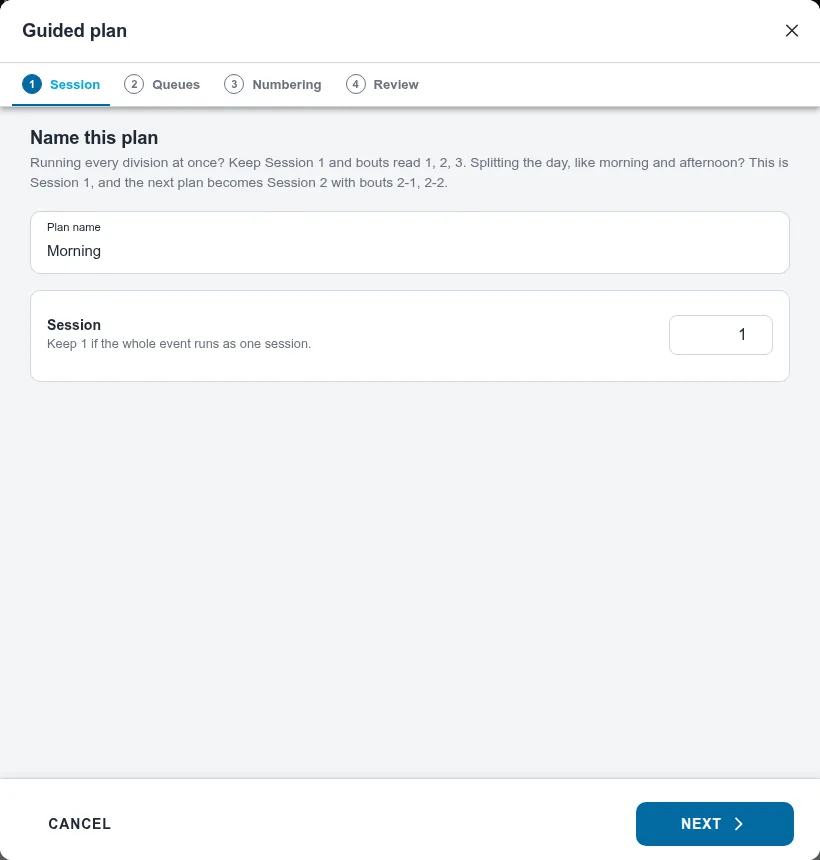
Section titled “1. Session”For the event’s first plan this step reads Name this plan. Name it, for example All divisions or Saturday morning. Running every division at once? Keep Session 1, and bouts
read 1, 2, 3. Splitting the day, like morning and afternoon? This is session 1, and your next
plan becomes session 2, whose bouts read 2-1, 2-2, so staff can tell which session a bout is
from.
Later plans ask Which session is this? and start the next session unless you pick an earlier one.
Several plans can share a session as long as they use different mats. That lets you plan a big session in pieces. If you pick a mat another plan in the same session already uses, the wizard says so and offers Use session N instead.
2. Queues
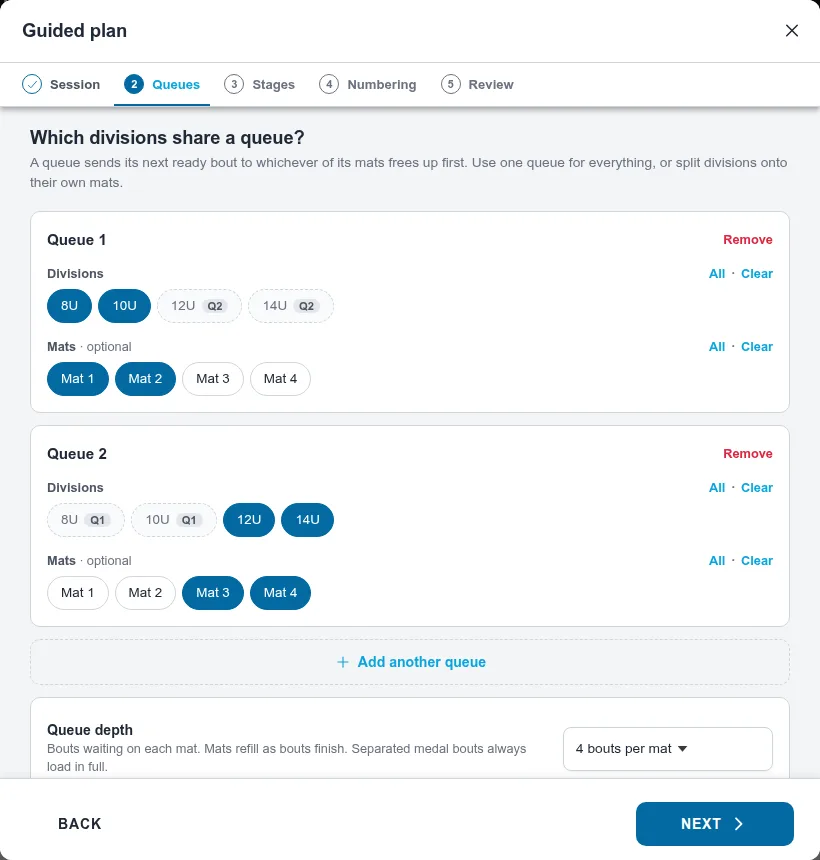
Section titled “2. Queues”A queue sends its next ready bout to whichever of its mats frees up first. Pick the divisions and mats for Queue 1. Use one queue for everything, or choose Add another queue to put divisions on their own mats.
Mats are optional. Leave them empty and you choose mats when you run the plan. Under Advanced, Queue depth sets how many bouts wait on each mat (4 by default).
3. Stages
Section titled “3. Stages”This step only appears when the divisions have pool brackets or medal bouts.
- Pool brackets: Run straight through or Pools first, then the rest, which runs the pools, then stages like Placement semifinals and Placement matches. See Schedule pool brackets.
- Finals run separately pulls the medal bouts you choose out of every queue, each on its own mat or one you choose when running. See Run finals on featured mats.
Anything past that, like semifinals on their own or only some rounds today, needs Custom rule; the step’s How to set it up link opens Schedule a two-day tournament.
4. Numbering
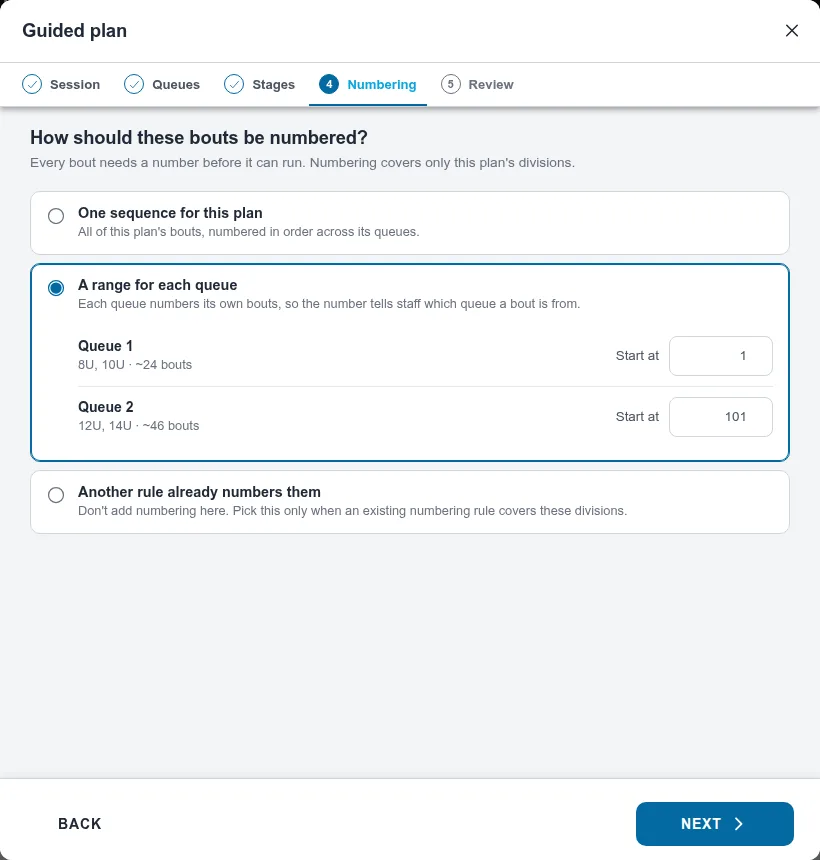
Section titled “4. Numbering”Every bout needs a number before it can run. Numbering covers only this plan’s divisions.
- One sequence for this plan numbers every bout in order across the queues. Set Start at.
- A range for each queue gives each queue its own start, so the number tells staff which queue a bout is from.
- Another rule already numbers them adds no numbering. Pick it only when an existing rule already numbers these divisions; otherwise the plan can’t run.
If the start overlaps another plan in the same session, the wizard suggests a start that keeps them apart.
5. Review
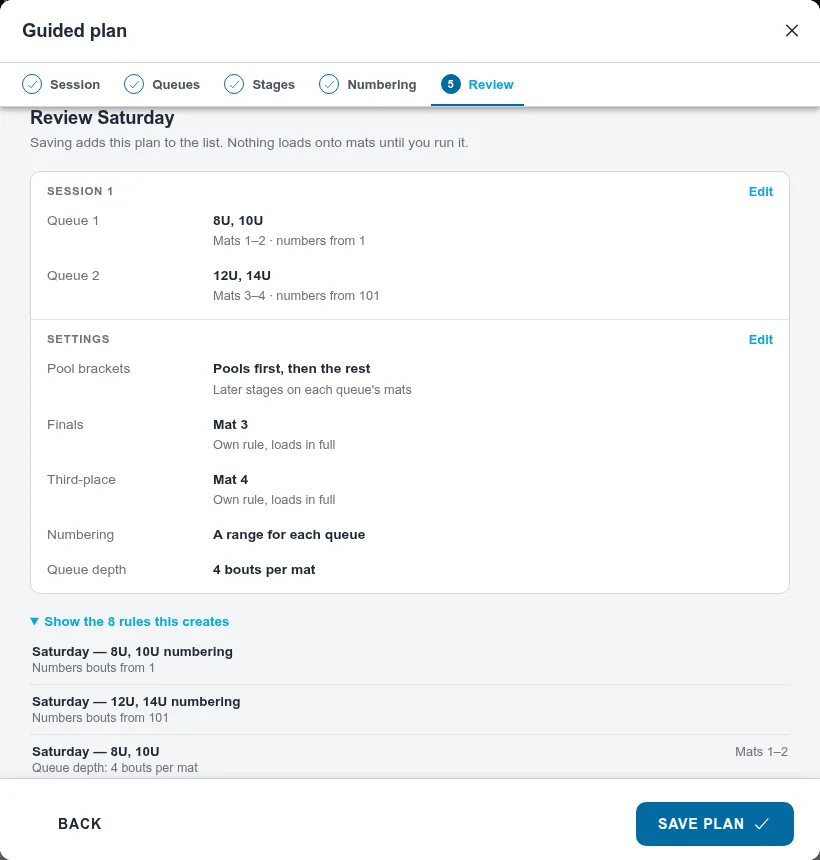
Section titled “5. Review”Check the queues, stages, and numbering, then choose Save plan. To see the exact rules the wizard creates, open Show the N rules this creates. When a queue’s numbers cover exactly its own bouts, one rule does both jobs; pulling medal bouts out or running pools first splits numbering into its own rule. The plan appears on Match Publishing as one row.
How session numbers affect bout numbers
Section titled “How session numbers affect bout numbers”Session applies to every numbering rule generated inside that plan. Session 1 keeps the
ordinary bout number. Session 2 adds 2- before it, session 3 adds 3-, and so on. Start at
still sets the number within the session:
| Session | One sequence starting at 1 | Queue or mat range starting at 101 |
|---|---|---|
| 1 | 1, 2, 3… | 101, 102, 103… |
| 2 | 2-1, 2-2, 2-3… | 2-101, 2-102, 2-103… |
| 3 | 3-1, 3-2, 3-3… | 3-101, 3-102, 3-103… |
With A range for each queue, session 2 prefixes every queue’s range: starts of 1 and 101 read 2-1 and 2-101. Auto-balance does the same for each mat’s range. In Custom rule, set Session beside Start at when Number bouts is selected.
Another rule already numbers them leaves numbering to that other rule, including its session. Separate Finals and pool-stage queues use the numbers supplied by the plan’s numbering rules. Choose the session before numbering; changing a saved setup doesn’t immediately change existing bout numbers. Save and review Run to apply changes. Started and finished bouts keep their numbers.
A session number doesn’t set a start time or automatically switch the mats. Run the plan when that session is ready. Plans and rules sharing a session still need separate bout-number ranges.
Run the plan
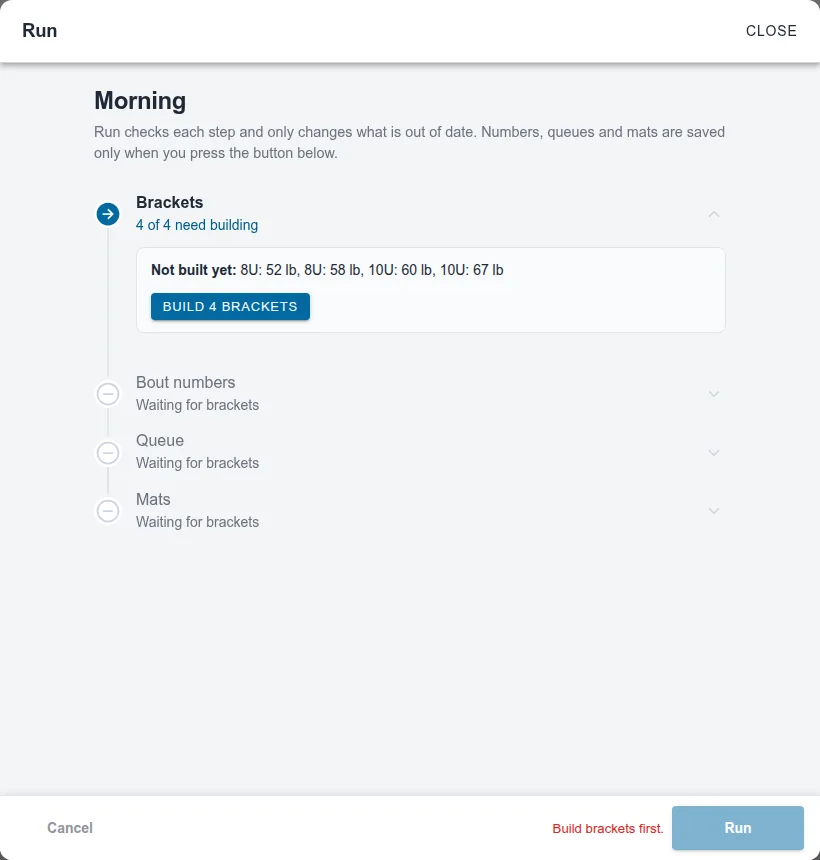
Section titled “Run the plan”Choose Run… on the plan’s row. Run checks four steps in order, Brackets, Bout numbers, Queue, and Mats, and only changes what’s out of date. Numbers, queues, and mat loads save when you press the button at the bottom, which says what it will do, such as Load 48 bouts. Building or updating brackets is a separate save that stays built if you cancel Run.
-
Brackets that were never built show as a step to take: choose Build N brackets.
-
On Mats, choose Not yet to number and queue without touching the mats, or load them now.
-
If two rules in the run plan the same mat, the Mats step says which one gets it, for example “Mat 3: Saturday — 8U and Saturday — 10U both plan it, so it runs Saturday — 10U.” Change which rule that mat pulls from in the mat list if you meant the other. Finals and later pool stages wait for their own run and don’t count.
For the full Run screen, see Create a director-managed tournament flow and finals rules.
Correct a bracket after the plan runs
Section titled “Correct a bracket after the plan runs”Open Brackets, turn on Edit, and correct the wrestlers or bracket format. Return to Match Publishing and choose Run… on the plan showing N need attention. Run updates the changed brackets before reviewing numbers, queues, and mats. Leave Renumber everything off and use Keep what’s waiting; add new bouts on the running mats.
Wrestler-only edits keep their numbers. If a bracket gains or loses bouts or changes its round structure, only that bracket’s unwrestled bouts are renumbered into the proper rounds. Labels such as 101.A fit them around the other brackets’ fixed numbers. See Change brackets after publishing matches.
Change it later
Section titled “Change it later”Open the plan’s ⋮ menu and choose Edit plan…. The wizard reopens with your choices. Saving updates the plan’s rules in place, so mats and queues bound to it stay. Run it again to apply the change. See Change a plan after it runs.
Also covers: get matches onto the mats · assign matches to mats · mat assignments · bout numbers · send bouts to mats · make the schedule · plan a schedule · custom schedule · add plan or schedule · edit schedule · finals on their own schedule