

Change a plan after it runs
Things change on the day: a division moves to other mats, a mat goes down, finals move to a featured mat. You can change a plan or rule after it has run. Bouts that have started or finished never move or get a new number.
Edit a plan
Section titled “Edit a plan”- On Match Publishing, open the plan’s ⋮ menu and choose Edit plan….
- The wizard reopens with your earlier choices. Change what you need and choose Save plan.
Saving updates the plan’s rules in place, so mats keep pulling from the same rules. If your change removes a rule, for example a queue you deleted, Review says so first: mats it feeds stop pulling from it, and its bout numbers stay.
Saving doesn’t touch numbers or mats. Run the plan again to apply the change.
Run it again
Section titled “Run it again”Choose Run… on the plan. Run only changes what’s out of date.
Bout numbers. New bouts get numbers and existing numbers stay put. A bout that has to fit between two numbered bouts takes a free number or a letter, like 214.A. If you also changed a bracket’s match structure, Run renumbers that bracket’s unwrestled bouts into round order while preserving the other brackets’ numbers. See Change brackets after publishing matches. Turn on Renumber everything for a clean sequence. Started and finished bouts always keep their number.
Mats. Choose one:
- Not yet saves numbers and the queue without touching the mats.
- Keep what’s waiting; add new bouts leaves every waiting bout in order and slots new bouts in.
- Replace what’s waiting sends waiting bouts back to their queue and reloads the mats. Started and finished bouts stay put.
Turn on Put back in running order on the Queue step to undo manual moves in the queue.
If two rules in the run plan the same mat, the Mats step names the one that gets it (“Mat 3: … both plan it, so it runs …”). Change which rule that mat pulls from in the mat list if you meant the other.
Delete a plan or rule
Section titled “Delete a plan or rule”Open the plan’s ⋮ menu and choose Delete plan and N rules…. You can also delete a single rule from its own menu with Delete rule, or tick several and choose Delete.
If the plan or rule has numbered or loaded bouts nobody has wrestled yet, the dialog asks what to do with them:
- Take them off the mats (the default) takes them off the mats and out of the queue. Bouts the deleted rules numbered lose their numbers until another plan or rule runs them.
- Leave them as they are keeps their numbers and mat spots, but no rule manages them anymore.
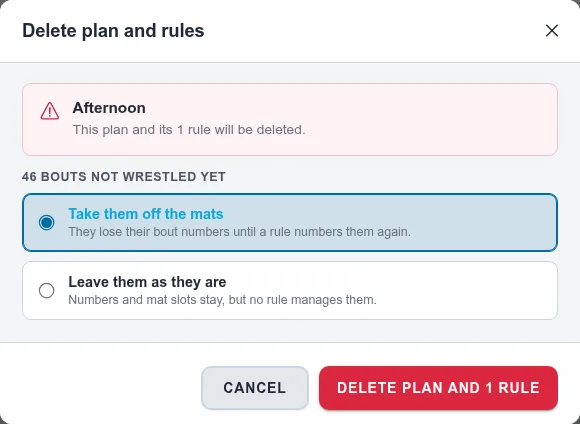
Wrestled bouts always keep their numbers and results. Taking the bouts off the mats is usually what you want when you’re about to rebuild the plan. Leftover numbers from a deleted plan would otherwise stay reserved and block the next plan in that session.
If Run stops on a bout number
Section titled “If Run stops on a bout number”Run stops when a number it needs already belongs to another bout, and names that bout, for example “Bout 2-201 is already used in MS: Group #5”. Either give one plan or rule another start number or session, or run one that covers that bout with Renumber everything.
Related: Plan your tournament schedule and Repair matches and rule queues.
Also covers: change a schedule after it runs · edit schedule · save schedule · delete schedule