

Schedule a two-day tournament
A state-style tournament often wrestles through the quarterfinals and the blood round on day 1, then semifinals, placements, and a finals wave on day 2. Guided plan splits by division, not by round, so this uses Custom rule, which can filter by tournament round. The same recipe covers “only the first three rounds today” and “semifinals on their own”.
Example: 16-man brackets. Day 1 on Mats 1–8. Day 2 on Mats 1–6, with Finals on Mat 1 and Third-place on Mat 2.
If each day needs its own registration or results page, create two events instead.
1. Check the round order
Section titled “1. Check the round order”Every bout belongs to a tournament round. Custom rules pick rounds, so the days have to fall on round boundaries.
- On Match Publishing, choose Round order: Balanced to open Round Order.
- Find the last round you want on day 1. Every bracket round in it, like Quarterfinal and the consolation round before placing, must belong on day 1.
- If a tournament round mixes day 1 and day 2 bouts, choose Add Round, pick where it goes, and drag the day 2 bracket rounds (for example Semifinal) into it.
- Rename rounds if it helps, for example
Day 2 · Semifinals, then choose Save Changes. The button now reads Round order: Custom.
See How Snapdown orders tournament rounds.
2. Create the day 1 rule
Section titled “2. Create the day 1 rule”Choose Custom rule (or Add, then Custom rule):
- Rule name:
Day 1. - Tick Number bouts, Start at 1, Session 1.
- Tick Assign bouts to mats. Planned mats: Mats 1–8. Queue depth: 4 bouts per mat.
- Tournament Rounds: pick the day 1 rounds.
- Choose Save rule.
3. Create the day 2 rules
Section titled “3. Create the day 2 rules”Day 2 needs one numbering rule and separate mat rules, because the placement bouts leave the main queue but still need numbers.
- Day 2 numbers: Custom rule, tick only Number bouts, Start at 1, Session 2. The editor shows the labels: 2-1, 2-2…. Tournament Rounds: every day 2 round.
- Day 2: Custom rule, tick only Assign bouts to mats, Planned mats: Mats 1–6. Tournament Rounds: the same day 2 rounds. Placement bouts: Exclude placement bouts.
- Finals: Custom rule, tick only Assign bouts to mats, Planned mats: Mat 1, Queue depth: Unlimited. Placement bouts: Placement bouts only, then 1st Place under Placements in this rule.
- Placements: the same as step 3 with 3rd Place, 5th Place, and 7th Place on Mats 2–6.
Exclude placement bouts holds back every placement bout, so step 4 has to cover every placement your brackets wrestle, or those bouts end up in no queue. Run lists anything left out under Not in any rule.
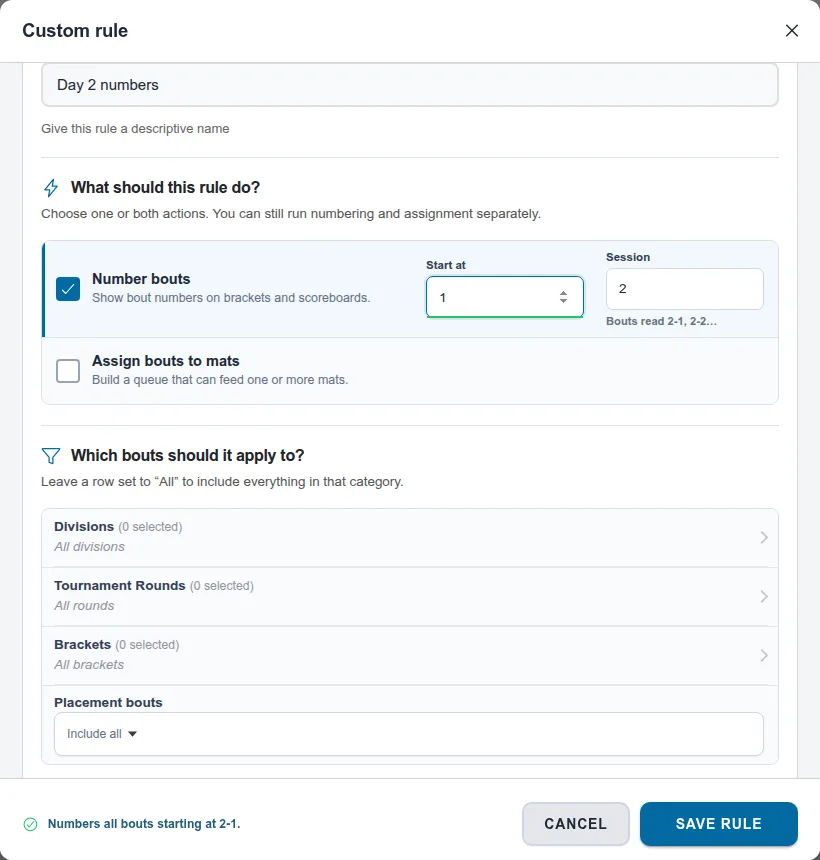
Putting day 2 in session 2 makes its bouts read 2-1, 2-2, so staff can tell the days apart at a glance. Session 1 keeps ordinary numbers, and session 3 would read 3-1, 3-2. The prefix comes from Day 2 numbers, including for bouts sent to the separate Finals and Placements queues. Start at counts within the session. If another session 2 rule already uses those numbers, the editor warns that Run would stop on the overlap and suggests a free start.
4. Run each day
Section titled “4. Run each day”- Day 1 morning: choose Run… on Day 1 and Load N bouts.
- End of day 1 or day 2 morning: choose Run… on Day 2. If Run says bouts have no number yet, choose Also run Day 2 numbers. Load Mats 1–6.
- Placement round: tick Finals and Placements and choose Run selected…. If a mat is still running day 2 bouts, Run says so and suggests loading it once they finish. Keep what’s waiting; add new bouts puts the placement bouts behind the bouts already on each mat.
Other splits with the same recipe
Section titled “Other splits with the same recipe”- Only some rounds today: one rule with Tournament Rounds set to rounds 1–3, and another for the rest.
- Semifinals on their own: give semifinals their own tournament round (step 1), then a rule for just that round on the mats you want.
- Round order changed after bouts were numbered: run the affected rules with Renumber everything and Put back in running order.
Related: Create a director-managed tournament flow and finals rules and Plan your tournament schedule.
Also covers: tournament runs Saturday and Sunday · weekend tournament · multi-day tournament · finish brackets on day 2 · split the tournament across two days · custom schedule · plan a schedule · not in any schedule